
Twitch Chat Overlay with 7TV
Customize your Twitch chat overlay to match your stream — directly in the browser. Choose a style, adjust colors, fonts and effects, then copy the finished OBS link.
Features
What the Chat Overlay Can Do
🎨
Design Styles + Overrides
Presets like Glass, Neon, Cyberpunk, Retro and more — fully customizable for any look.
💬
Emotes & Paints
Twitch, 7TV, FFZ, and BTTV are supported so emotes and colors display correctly.
👤
Badges & Avatars
Twitch profile pictures and badges are shown by default.
🧹
Bot Filter
Known bots are automatically hidden, and you can add your own names to the filter list.
📀
Layout
Alignment, compact mode and profile pictures are adjustable so the layout fits your stream exactly.
👁️
Live Preview
Test settings directly and then copy the finished OBS link.
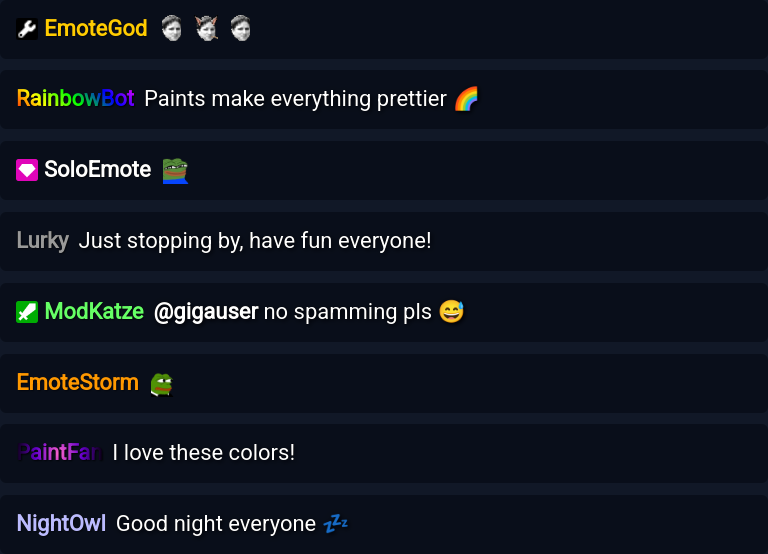
The chat overlay supports all major emote platforms, so Twitch, 7TV, FFZ, and BTTV emotes display correctly. Static and animated 7TV colors are applied automatically. Your chat looks in stream exactly like it does in Twitch itself — but with your own design.
Tip: Want chat, alerts and a countdown in a single browser source? In the Overlay Builder in ByteMate, you place this chat overlay on one canvas together with an alert box, countdown, counters and your own images — free, no extra software, currently in beta.
FAQ
Frequently Asked Questions
A chat overlay is a browser source you add in OBS or other streaming software. It makes your Twitch chat visible in your stream — with custom colors, fonts, and emotes.
The chat overlay supports Twitch emotes, 7TV emotes (including paint styles and color gradients), FFZ, and BTTV. Animated emotes and colors are displayed correctly as well.
No — you can configure the overlay entirely without signing up or installing anything. Just use the configurator in the browser and generate a ready-to-use OBS link.
There are 11 design styles, including Darkglass, Glass, Aurora, Neon, Cyberpunk, Pixel, Glitch, and Retro. Each style can be fully overridden — background color, font, border, glow effect, and more.
Yes — the overlay has a built-in bot filter. Known bots like Nightbot can be automatically hidden on request. You can also manually exclude custom usernames.
Yes, the overlay automatically displays Twitch profile pictures and badges (Subscriber, Moderator, VIP, etc.) next to chat messages.
Yes — it works with any streaming software that supports browser sources, including OBS Studio, Streamlabs, and XSplit.
Not with this overlay — it shows chat only. In the Overlay Builder in ByteMate, chat is one widget alongside an alert box, countdown, counters and your own images or videos, and the whole scene goes into OBS as a single browser source — free, currently in beta.
Ready for Your Own Chat Overlay?
Configure your overlay in under a minute — free and without signing up.